Create Your Magius Casino UK Account — Fast Registration and Instant Bonus Activation

Creating an account at Magius Casino takes under two minutes. Once registered, you unlock 4,000+ games, a 100% welcome bonus up to £425, 200 free spins, and a fully integrated sportsbook - all in one place. This guide walks you through every step, from the sign-up form to your first login.

£20 deposit · 100% + 200 spins
Create Accountwith bonus

What You Get With a Magius Account

Before you start, it helps to know exactly what registration unlocks. A verified Magius Casino account gives you access to the full catalogue, all promotions, and the cashier - none of these are available to guests.

Feature Detail
Welcome bonus 100% up to £425 plus 200 free spins
Games available 4,000+ slots, live tables, instant games
Minimum deposit £10 to activate the welcome offer
Minimum age 18 years
Accepted currency GBP for UK players

The free spins arrive in daily batches of 20 over ten consecutive days, so the bonus stays active well beyond your first session. Wagering on the bonus is 35x the bonus amount; free spin winnings carry a 40x requirement.

Open Your Account

What You Need Before Signing Up

Magius Casino accepts players from the United Kingdom, Ireland, Germany, the Netherlands, and a number of other European markets. The minimum age is 18 - this is verified both at registration and again during the KYC process before your first withdrawal.

To complete the form you will need:

  • A valid email address you can access immediately
  • A mobile phone number (used for account security)
  • Your home address in full, including postcode
  • Your date of birth
  • A password you have not used on other gambling sites

You do not need a promo code. The welcome bonus activates automatically after your first qualifying deposit of £10 or more.

Skrill and Neteller deposits are excluded from the welcome bonus. If you plan to use these e-wallets, the bonus will not be applied to that deposit.

Finding the Registration Button

On desktop, the 'Register' button sits in the top-right corner of every page on the Magius Casino website. On mobile, the same button appears in the header once you land on the homepage. There is no separate app to download - the site runs as a Progressive Web App (PWA) through your browser on both iOS and Android, and the registration flow is identical on all devices.

Tapping 'Register' opens a single-page form. The whole process happens without redirects or page reloads.

How to Register at Magius Casino

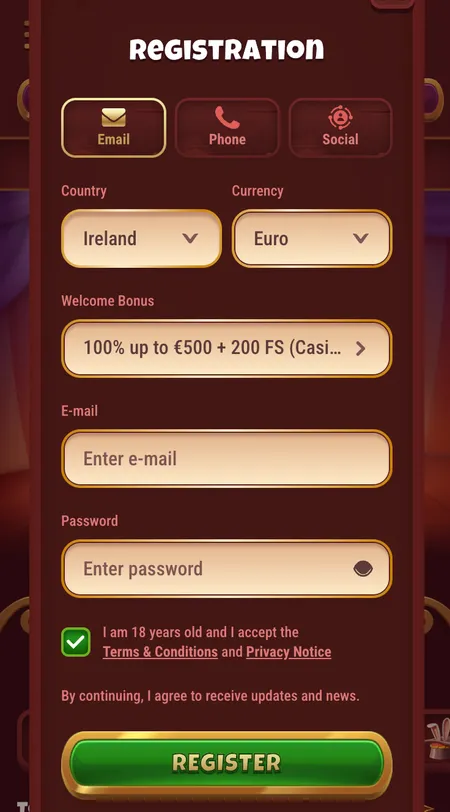
  1. Magius Casino registration form first step

    Step 1 - Fill in your details. Enter your first name, last name, email address, phone number, home address, and date of birth. Choose a strong password of at least eight characters. Tick the boxes to confirm you are 18 or older and agree to the terms and conditions.

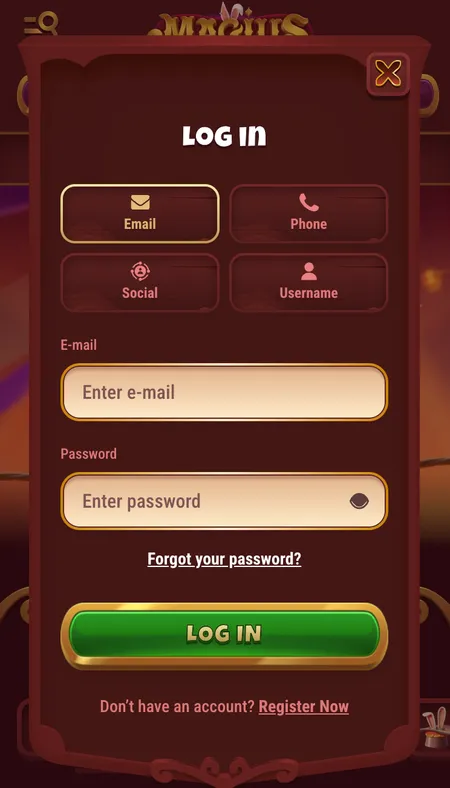
  2. Magius Casino login screen after account creation

    Step 2 - Log in and make your first deposit. Once the form is submitted, your account is created instantly. No email confirmation is required at this stage. Log in with your email and password, navigate to the cashier, and deposit £10 or more to trigger the welcome bonus automatically.

Inside the Registration Form

The form is straightforward. There are no optional fields that slow things down - every field shown is required to create a compliant account. Here is what each section covers:

Personal information

Name, date of birth, and address fields. Use your legal name exactly as it appears on your ID - the KYC check later will compare these details against your documents.

Contact details

Email and phone number. These become your recovery options if you ever lose access to the account.

Password

Choose something unique to Magius. The platform does not enforce a character limit beyond a minimum length, but a mix of letters, numbers, and symbols reduces risk significantly. Magius uses 256-bit SSL encryption on all data submitted through the site.

Agreements

Two tick boxes: age confirmation (18+) and acceptance of the terms and conditions. Read the bonus terms before ticking, especially if you intend to claim the welcome offer.

Start Registration

Account Confirmation After Submitting

Unlike many operators, Magius does not require you to verify your email address before playing. The account goes live the moment you submit the form. You will receive a welcome email, but it is informational rather than a mandatory confirmation step.

If you do not receive the welcome email within a few minutes, check your spam folder. Emails from NovaForge Limited (the operator behind Magius) occasionally land in promotions or junk filters. You can also contact the 24/7 live chat - agents typically respond within two to three minutes.

Magius Casino accounts are created instantly. You can deposit and start playing within minutes of submitting the registration form - no waiting period required.

KYC Verification: What Happens Next

You can play and deposit immediately after registration, but you will need to complete KYC (Know Your Customer) verification before your first withdrawal. This is standard practice across licensed operators and protects both the player and the platform.

Documents required:

  • Proof of identity: passport, driving licence, or national ID card. All four corners must be visible, and the document must be current.
  • Proof of address: utility bill, bank statement, or government correspondence dated within the last three months.
  • Payment method verification: a screenshot of your e-wallet or a photo of your card may be needed depending on the deposit method used.

The verification team processes documents within 24 to 48 hours. First withdrawals may take an additional 12 to 24 hours on top of that for a full account and payment method review.

Upload your documents through the KYC section inside your personal account. The same area shows the current status of each document submitted.

Registering on Mobile and Different Devices

The Magius Casino website is fully responsive. The registration form adapts to any screen size - smartphone, tablet, or desktop - without losing any fields or steps. There is no dedicated iOS or Android app to install, but you can save the site to your home screen for one-tap access that behaves like a native app.

On mobile, biometric login (Face ID or fingerprint) becomes available after your first manual login. This speeds up future sessions considerably compared to typing a password on a small screen.

Device Registration method Notes
Desktop (Chrome, Firefox, Safari) Browser, full site Recommended for first-time registration
Android smartphone Mobile browser or PWA Add to home screen for app-like access
iPhone / iPad Mobile browser or PWA Face ID login available after first sign-in

The Magius Magius Casino app page has more detail on how to set up the PWA shortcut on your specific device.

Register and Claim Bonus

Your Profile After First Login

Once inside, the personal account dashboard shows your real-money balance and any active bonus balance separately. The 'My Bonuses' tab lets you track wagering progress on the welcome offer in real time.

Key sections available from day one:

  • Transaction history - every deposit and withdrawal logged with timestamps
  • Bet history - game-by-game record of your activity
  • Responsible gambling tools - daily, weekly, and monthly deposit limits set directly in account settings
  • KYC uploads - document submission and status tracking
  • Bonus Crab - the platform's unique gamification mechanic that awards prizes for completing tasks and depositing

Responsible gambling limits take effect immediately when set. There is no cooling-off period between setting a limit and it becoming active.

Account Security After Registration

Magius protects accounts with 256-bit SSL encryption on all connections. The site operates exclusively over HTTPS, so data in transit is always encrypted.

After registration, consider the following steps to keep your account secure:

  • Use a unique password not shared with other sites or email accounts
  • Enable biometric login on mobile as an additional layer of access control
  • Set deposit limits from the outset to stay within your intended budget
  • Check your email for any unrecognised login notifications

Only payment methods registered in your own name can be used. Third-party deposits are not permitted - this is both a security and an AML (Anti-Money Laundering) requirement under the operator's licence (ALSI-152406028-FI2, issued by Anjouan Gaming).

For a full overview of what Magius offers once you are inside, the Magius Casino homepage covers the complete feature set including the sportsbook, live casino, and VIP programme.

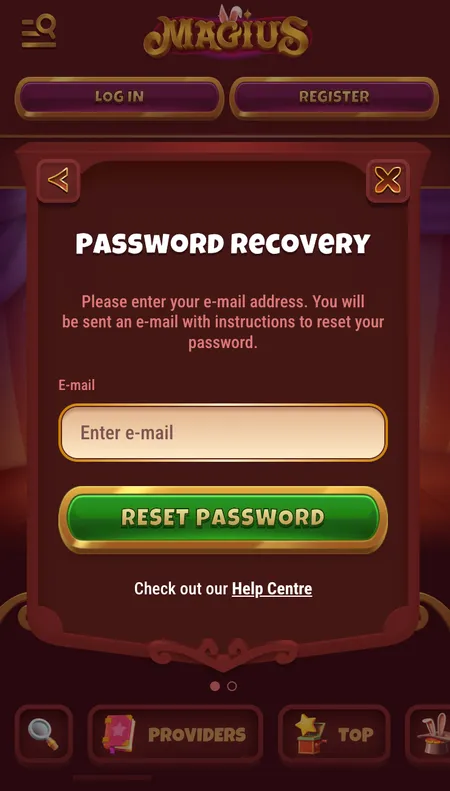
Magius Casino password reset screen

If you forget your password, use the reset link on the login page. Enter your registered email address and a reset link arrives within a few minutes.

Common Registration Problems and How to Solve Them

Most issues during sign-up are straightforward to fix:

  • 'Email already in use' - you may have registered before. Use the password reset function on the login page rather than creating a duplicate account.
  • SMS code not arriving - check that the phone number entered matches your current SIM. If the issue persists, contact live chat.
  • Form not submitting - clear your browser cache or try a different browser. The site loads in under three seconds on standard connections, so a slow response usually indicates a local network issue.
  • Bonus not applied after deposit - confirm the deposit method is not Skrill or Neteller, and that the deposit amount was at least £10. If both conditions are met, contact support with your transaction reference.

FAQ

How long does Magius Casino registration take?

The form takes under two minutes to complete. Account activation is instant - there is no mandatory email confirmation before you can log in and deposit.

Do I need a promo code to get the welcome bonus?

No promo code is required. The 100% bonus up to £425 and 200 free spins activate automatically after a qualifying deposit of £10 or more.

Can I register from the UK?

Yes. Magius Casino actively accepts UK players. Accounts are denominated in GBP and the site is fully localised for the UK market.

What is the minimum age to register?

You must be at least 18 years old. Age is verified at registration and confirmed again during the KYC process before withdrawals are approved.

Is my personal data safe when I register?

All data submitted through the registration form is protected by 256-bit SSL encryption. Magius operates under the Anjouan Gaming licence (ALSI-152406028-FI2) and enforces strict KYC and AML procedures.

Can I have more than one account?

No. Magius allows one account per person. Creating duplicate accounts is a violation of the terms and can result in account closure and forfeiture of funds.

What documents do I need for KYC verification?

A government-issued photo ID (passport, driving licence, or national ID card) and a proof of address document dated within the last three months. Payment method verification may also be required.

Can I register using a mobile phone?

Yes. The registration form works on any smartphone browser. The experience is identical to desktop, and you can add Magius to your home screen as a PWA after signing in.

What happens if my email is not confirmed?

Magius does not require email confirmation before you can play. The account is live immediately. A welcome email is sent for reference, but it is not a blocking step.

How do I reset my password if I forget it?

Click the 'Forgot Password' link on the login page, enter your registered email address, and follow the reset link sent to your inbox. The process takes a few minutes.

Ready to join Magius Casino? Create your account in under two minutes and claim your welcome bonus of up to £425 plus 200 free spins.